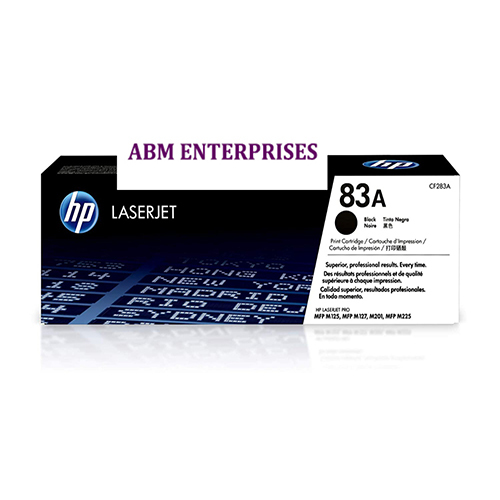
About HP 83A Black LaserJet Toner Cartridge
Brand: HP
Product: New
Generic Name: Toner Cartridge
Model no.: 83A
Colour: Black
Compatible With -HP LaserJet Pro MFP M127fs, M127fw, M127fn, MFP M125nw, MFP M225dw, MFP M225dw, MFP M225dn ,M201dw,MFP M225dn
Consistent Print QualityExperience sharp, bold black text and exceptional clarity on every page with the HP 83A Black LaserJet Toner Cartridge. Its precision engineering ensures consistent results throughout the cartridge's lifespan, reducing reprints and helping your documents maintain a polished, professional appearance.
Simple, Hassle-Free InstallationReplacing your toner is fast and straightforward with the HP 83A cartridge. Its user-friendly design fits seamlessly into compatible HP LaserJet printers, enabling quick installation without mess or complexity. Enjoy uninterrupted workflow and reliable operation from your first print to your last.
Cost-Effective and Reliable PerformanceThe HP 83A cartridge provides an impressive yield of up to 1,500 pages, allowing you to manage your printing budget efficiently. Its robust design ensures steady performance across demanding print jobs, giving users a dependable and economical printing solution for various needs.
FAQ's of HP 83A Black LaserJet Toner Cartridge:
Q: How do I install the HP 83A (CF283A) Black LaserJet Toner Cartridge in my printer?
A: To install the HP 83A toner cartridge, open your printer's front cover, remove the used cartridge, and gently insert the new cartridge into the corresponding slot. Close the cover, and the printer is ready for use. Always refer to your printer's user manual for specific installation steps.
Q: What HP LaserJet printer models are compatible with the HP 83A toner cartridge?
A: The HP 83A (CF283A) toner cartridge is compatible with HP LaserJet Pro M201, M201dw, M201n, MFP M125a, M125nw, M125rnw, M127fw, M127fn, M127fp, M225dn, and M225dw. Ensure your printer model matches for optimal performance.
Q: When should I replace the HP 83A toner cartridge?
A: Replace the HP 83A toner cartridge when you notice a decline in print quality, such as faded prints or streaks, or when your printer displays a low toner warning. The cartridge can yield up to 1,500 pages, but frequent usage may require earlier replacement.
Q: Where should I store spare HP 83A toner cartridges?
A: Store spare HP 83A toner cartridges in a cool, dry environment. The recommended storage temperature ranges from -20C to 40C. Avoid exposure to direct sunlight or high humidity to maintain cartridge quality.
Q: What is the process for recycling used HP 83A toner cartridges?
A: You can return used HP 83A toner cartridges through HP's Planet Partners recycling program or local authorized recycling centers. This eco-friendly initiative ensures proper recycling and helps reduce environmental impact.
Q: How does using the HP 83A cartridge benefit me?
A: Using the HP 83A cartridge offers multiple benefits, including high page yield, consistent print quality, reliable performance, and cost-effective printing. It ensures professional-looking documents and minimizes downtime with its easy installation and dependable results.
 Send Inquiry




 Send Inquiry