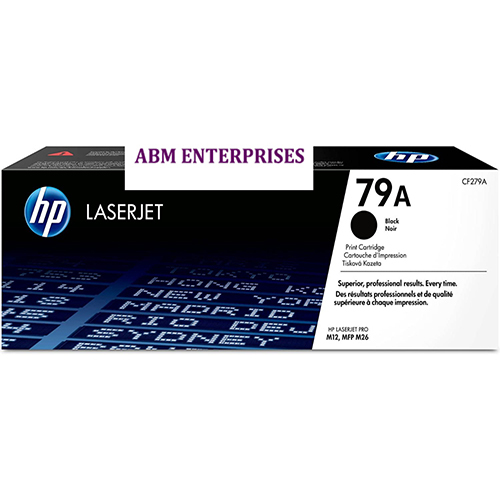
About HP 79A Black LaserJet Toner Cartridge
- Cartridge Colors: Black
- Print Technology: Laser
- Page yield black and white: 1,000 pages
- Product type: Standard Capacity Toner Cartridges
-
HP LaserJet Pro M12a Printer (T0L45A), HP LaserJet Pro M12w Printer (T0L46A), HP LaserJet Pro Multifunction Printer M26a Printer (T0L49A), HP LaserJet Pro Multifunction Printer M26nw Printer (T0L50A)
Consistent Professional QualityThe HP 79A Black LaserJet Toner Cartridge stands out with its ability to deliver consistent prints with sharp text and high contrast. Designed for regular use in offices, homes, and businesses, users can trust it for a superior finish every time. Experience uncompromising quality and reliability, ensuring every document upholds your professional standards.
Effortless and Quick InstallationDesigned with user convenience in mind, the HP 79A cartridge offers simple and hassle-free installation. Its precise engineering allows users to replace old cartridges with ease, minimizing printer downtime. The secure box packaging further ensures your cartridge arrives protected and ready for a smooth installation, making it easy to maintain uninterrupted workflow.
Versatile Usage Across EnvironmentsWhether you're printing at home, in a busy office, or for commercial purposes, the HP 79A cartridge supports your needs. Its dependable performance and page yield meet the high demands of business documents and day-to-day tasks alike. Perfect for A4 document printing, it is the go-to choice for different professional environments in India.
FAQ's of HP 79A Black LaserJet Toner Cartridge:
Q: How do I install the HP 79A Black LaserJet Toner Cartridge in my printer?
A: To install the HP 79A cartridge, first open your printer's toner access panel. Remove the old cartridge by pulling it gently outward, then unbox the new cartridge, remove all protective seals, and align it with the printer's tracks. Slide it in firmly until it clicks into place, close the panel, and your printer is ready for use.
Q: What types of printers are compatible with the HP 79A Toner Cartridge?
A: The HP 79A toner cartridge is specifically designed for HP LaserJet Pro M12 and M26 series printers. Always check your printer model for compatibility before purchasing to ensure optimal performance and print quality.
Q: When should I replace the HP 79A toner cartridge?
A: Replace the cartridge when print quality begins to diminish, such as faded or streaky text, or when the printer displays a low toner warning. On average, one HP 79A cartridge yields about 1000 pages, depending on your usage and print settings.
Q: Where can I use the HP 79A toner cartridge?
A: This cartridge is suitable for a range of environments, including offices, homes, and businesses across India. Its reliable performance makes it ideal for everyday printing, business reports, and professional documents on A4 paper.
Q: What is the process for recycling the used HP 79A cartridge?
A: You can recycle used HP 79A toner cartridges by participating in HP's recycling program. Visit the HP website or contact their local partners in India to find collection centers or arrange a pickup. Proper recycling helps reduce environmental impact.
Q: What are the main benefits of using an original HP 79A toner cartridge?
A: By choosing the original HP 79A cartridge, you gain consistent, high-quality prints with sharp text and professional results. Its reliable performance and easy installation reduce downtime, providing efficient and cost-effective printing for your daily tasks.
 Send Inquiry




 Send Inquiry