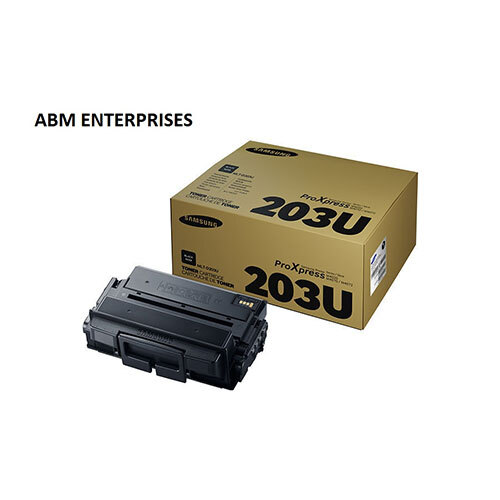
About Samsung MLT-D203U Black Toner Cartridge
Brand: Samsung
Model no.: MLT - D203U
Generic Name: Toner Cartridge
Part no.: D203U
Product: New
Colour: Black
PRODUCT TYPE : TONER CARTRIDGE
Samsung 203U Black Toner Cartridge (MLT-D203U), Ultra High Yield, offers vibrant print quality, exceptional reliability and performance for your photos and documents.
Ideal CompatibilityThe Samsung MLT-D203U toner cartridge is purpose-built for seamless integration with select Samsung laser printers, including SL-M4070FR, SL-M4020ND, and SCX-5935FN. Its compatibility ensures reliable operation and optimal print output, making it a dependable choice for business environments and professional use.
Maximize Print Quality and EfficiencyWith its high-yield capacity, the MLT-D203U cartridge ensures fewer replacements and consistent, crisp black prints on every page. Designed to deliver high performance while keeping operational costs in check, it is well suited for offices with demanding printing workloads.
Proper Storage for LongevityTo maintain the quality and effectiveness of the Samsung MLT-D203U cartridge, it is best stored in a cool and dry place. Proper storage conditions help preserve toner integrity, preventing clumping or damage and prolonging the cartridge's shelf life until it is ready to be installed.
FAQ's of Samsung MLT-D203U Black Toner Cartridge:
Q: How do I install the Samsung MLT-D203U Black Toner Cartridge in my printer?
A: To install the cartridge, open your printer's front cover and carefully remove the used cartridge. Unpack the new MLT-D203U cartridge, gently shake it to distribute the toner evenly, and insert it securely into the printer. Close the cover, and the printer will automatically recognize the new cartridge.
Q: What printers are compatible with the MLT-D203U Black Toner Cartridge?
A: This cartridge is designed for use with Samsung SL-M4070FR, SL-M4020ND, and SCX-5935FN laser printers, ensuring precise compatibility and efficient performance.
Q: When should I replace the MLT-D203U toner cartridge?
A: You should replace the cartridge when print quality declines or when your printer notifies you that toner levels are low or depleted. Timely replacement ensures continued crisp and clear printouts.
Q: Where should the Samsung MLT-D203U cartridge be stored when not in use?
A: For best results, store the cartridge in a cool and dry place, away from direct sunlight and humidity, to preserve toner quality and prolong shelf life.
Q: What steps are involved in the disposal of an empty MLT-D203U cartridge?
A: Empty toner cartridges should be disposed of according to local recycling guidelines. Many authorized dealers or Samsung service centers offer recycling programs to minimize environmental impact.
Q: How can using the MLT-D203U cartridge benefit my printing process?
A: The cartridge delivers consistently sharp black text and graphics, reduces the frequency of replacements, and contributes to smoother and more productive office workflow.
Q: What precautions should I take during cartridge usage?
A: Avoid touching the roller surface of the cartridge and handle it carefully to prevent toner leakage. Always keep the cartridge sealed until ready to use to avoid exposure to air and humidity.
 Send Inquiry





 Send Inquiry