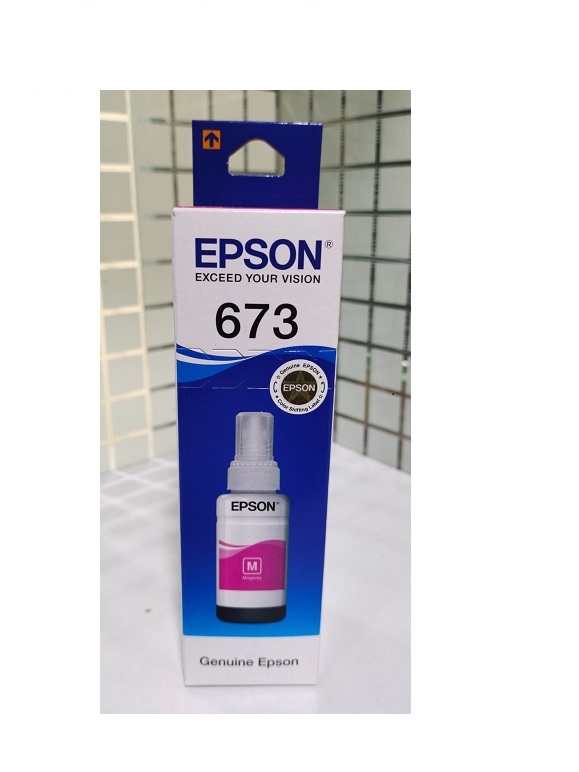
About Epson 673 Magenta ink Bottle
Brand: Epson
Product: New Genuine
Generic Name: Epson Original Ink Bottle
Model no.: 673
COLOUR : MAGENTA
PRODUCT TYPE : INK BOTTLE
Compatibility Use For - Epson L805 Wi-Fi Photo Ink Tank Printer, L850,L810, L1800
For Use Epson ink Tank Printer
Epson L805 Wi-Fi Photo Ink Tank Printer
Epson L850 Photo All-in-One Ink Tank Printer
Epson L810 Ink Tank System Printer
Epson L1800 A3 Photo Ink Tank Printer
Vibrant Magenta for High-Quality PrintsThe Epson 673 Magenta Ink Bottle delivers bold, true-to-life magenta shades, enhancing your photographs and documents with precision. Its formulation is engineered to work seamlessly with Epson compatible models, ensuring sharpness and color consistency in every print. Ideal for home or office use, this ink is a preferred choice among users who value durability and reliability in their printing supplies.
Simple and Safe Refilling ProcessDesigned for ease of use, the Epson 673 Magenta Ink Bottle features an ergonomic design that minimizes mess during refills. The bottle is compatible with several popular Epson printers, making the process convenient and efficient. Always ensure the printer is powered down before refilling and consult your printer's manual for detailed instructions, ensuring both safety and optimal printer performance.
FAQ's of Epson 673 Magenta ink Bottle:
Q: How do I refill my Epson printer with the 673 Magenta Ink Bottle?
A: Turn off your printer, carefully open the ink tank cover, and unscrew the cap of the magenta compartment. Remove the seal from the 673 Magenta Ink Bottle and gently insert the nozzle into the tank. Squeeze slowly until the tank is filled, then securely close the tank to prevent leaks.
Q: What Epson printers are compatible with the 673 Magenta Ink Bottle?
A: This magenta ink bottle is compatible with a range of Epson printers, including the L805 Wi-Fi Photo Ink Tank Printer, L850, L810, and L1800 models. Always check your printer's specifications to ensure compatibility.
Q: When should I replace or refill the magenta ink in my printer?
A: It's best to refill the magenta ink once your printer notifies you of low ink levels, or when print quality starts to diminish. Regular monitoring helps maintain consistent print output and prevents interruption during important print tasks.
Q: Where should I store my Epson 673 Magenta Ink Bottle?
A: Store the ink bottle in a dry place, away from direct sunlight and extreme temperatures. Proper storage helps maintain the ink's quality and prevents it from drying out or degrading over time.
Q: What are the main benefits of using Epson 673 Magenta Ink Bottle?
A: This ink bottle provides high-quality, vibrant magenta color, ensures reliable performance with compatible Epson printers, and offers a spill-free, user-friendly refilling experience. Using genuine ink helps preserve your printer's lifespan and printing accuracy.
Q: What process should I follow for safe ink storage and handling?
A: Keep the ink bottle tightly sealed when not in use, and store it upright in a cool, dry place. Handle with clean hands and avoid contact with eyes or skin to ensure safe and effective storage and usage.
 Send Inquiry




 Send Inquiry